
Authentication - Authorization Code Flow
z-Pax APIs adhere to REST standards, supporting GET and POST HTTP methods. For secure access, use OAuth 2.0 authorization, as detailed below.
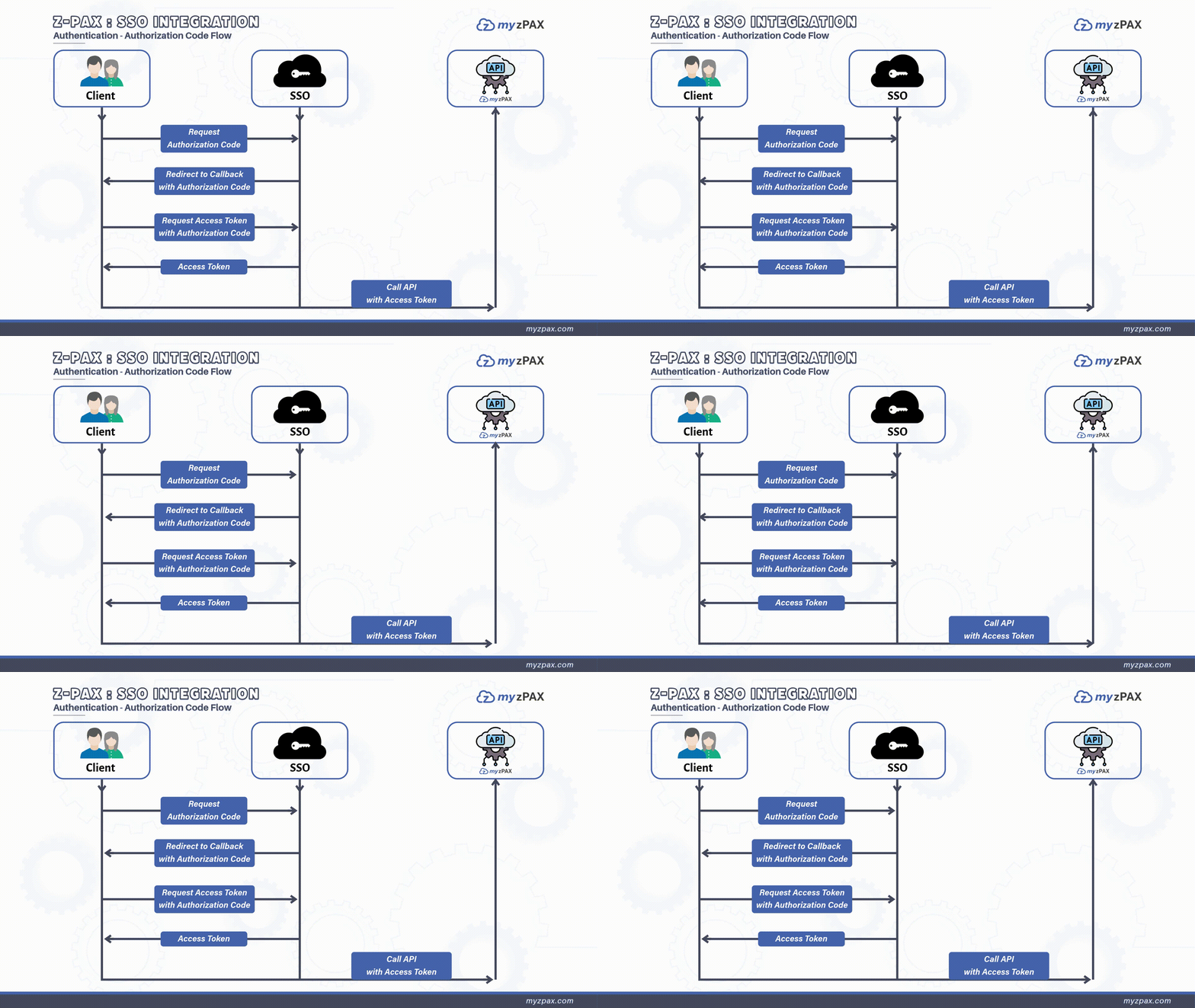
For authorization, use the OAuth 2.0 flow as illustrated below:
OAuth 2.0 Credentials
The following credentials are required for OAuth 2.0 authorization:
- Client ID: A unique identifier for your application (e.g., your-client-id).
- Client Secret: A confidential string used to authenticate your application with the authorization server.
- Redirect URL: The URL registered with z-Pax to receive the authorization code.
To request your Client ID and Client Secret, send an email to the myzPAX team.
Requesting an Authorization Code
To begin authorization, the client application requests an authorization code by redirecting users to the SSO provider’s authorization endpoint Connect_Authorize API with the following parameters:
client_id: The unique identifier of your application.scope: Includescope = offline_accessto request a refresh token.response_type: Use code to request an authorization code.redirect_uri: The registered redirect URI where the authorization response will be sent.
Handling the Redirection
Upon successful authentication, the SSO provider redirects to your specified redirect_url with an authorization code. This code can now be exchanged for an access token.
Exchanging the Authorization Code for an Access Token
The client application exchanges the authorization code for an access token by making a request to the SSO’s token endpoint Token Exchange API. The request should include:
client_id: Your application’s client ID.client_secret: The client secret assigned to your application.
If the request is valid, the SSO issues:
- An access token for API access.
- An optional refresh token to obtain new access tokens when the current one expires.
Access Token Payload
The access token includes the following information:
| Claim | Description |
|---|---|
iss | The domain that issued the token. |
exp | The expiration time of the access token. |
iat | The issue time of the token. |
jti | A unique identifier for the token (JWT ID). |
sub | The unique identifier for the user (in authorization code flow). |
UserId | A unique ID representing the logged-in user. |
SessionId | A unique session ID for each user session. |
Token Timeouts
Session timeout: 60 minutes.Access token timeout: 20 minutes.Refresh token timeout: 60 minutes.
Making Authenticated API Calls
With a valid access token, your client application can make authorized API requests on behalf of users, securely accessing protected resources.
Retrieving User Information
To obtain user-specific details, use the User info API endpoint. This endpoint retrieves information (e.g., first name, last name, email) by referencing the user’s unique ID from the database.