
Client Configuration
The Client Configuration module can be accessed via the Client Configuration tab in the App Management window.
This module contains key settings that determine how an application integrates with and authenticates through the myzPAX Portal.
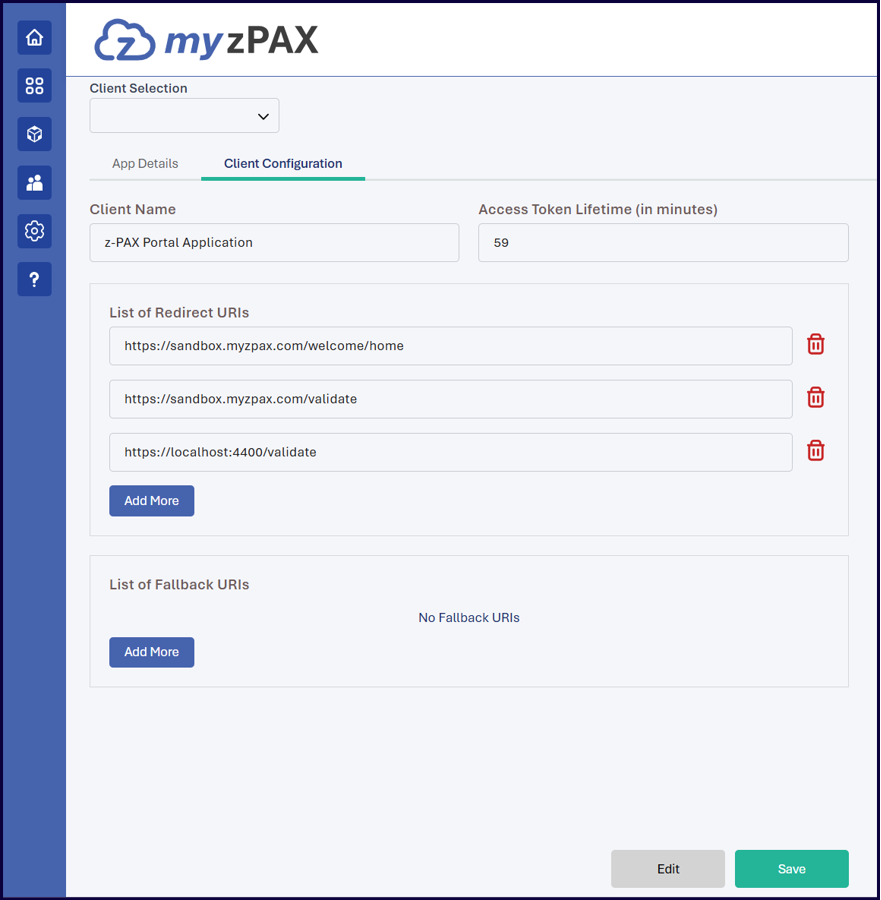
Open Client Configuration
- Go to App Management.
- Select the Client Configuration tab.
Configure Client Settings
You can configure the following fields:
- Client Name: Specifies the name of the client application embedded in the myzPAX Portal.
- Access Token Lifetime (in minutes): Defines the duration, in minutes, for which the access token remains valid before expiration.
- List of Redirect URLs: Specifies the authorized callback URLs to which the myzPAX Portal redirects end users after successful authentication or validation. Use Add More to include additional redirect URLs.
- List of Fallback URLs: Specifies predefined URLs used to route end users to alternate destinations (typically the marketing page of an application) when the end user does not grant consent or does not have the required permissions or entitlements to access the application. Use Add More to add additional fallback URLs.
Save Configuration
- Click Edit to modify configuration details.
- Click Save to apply the changes.